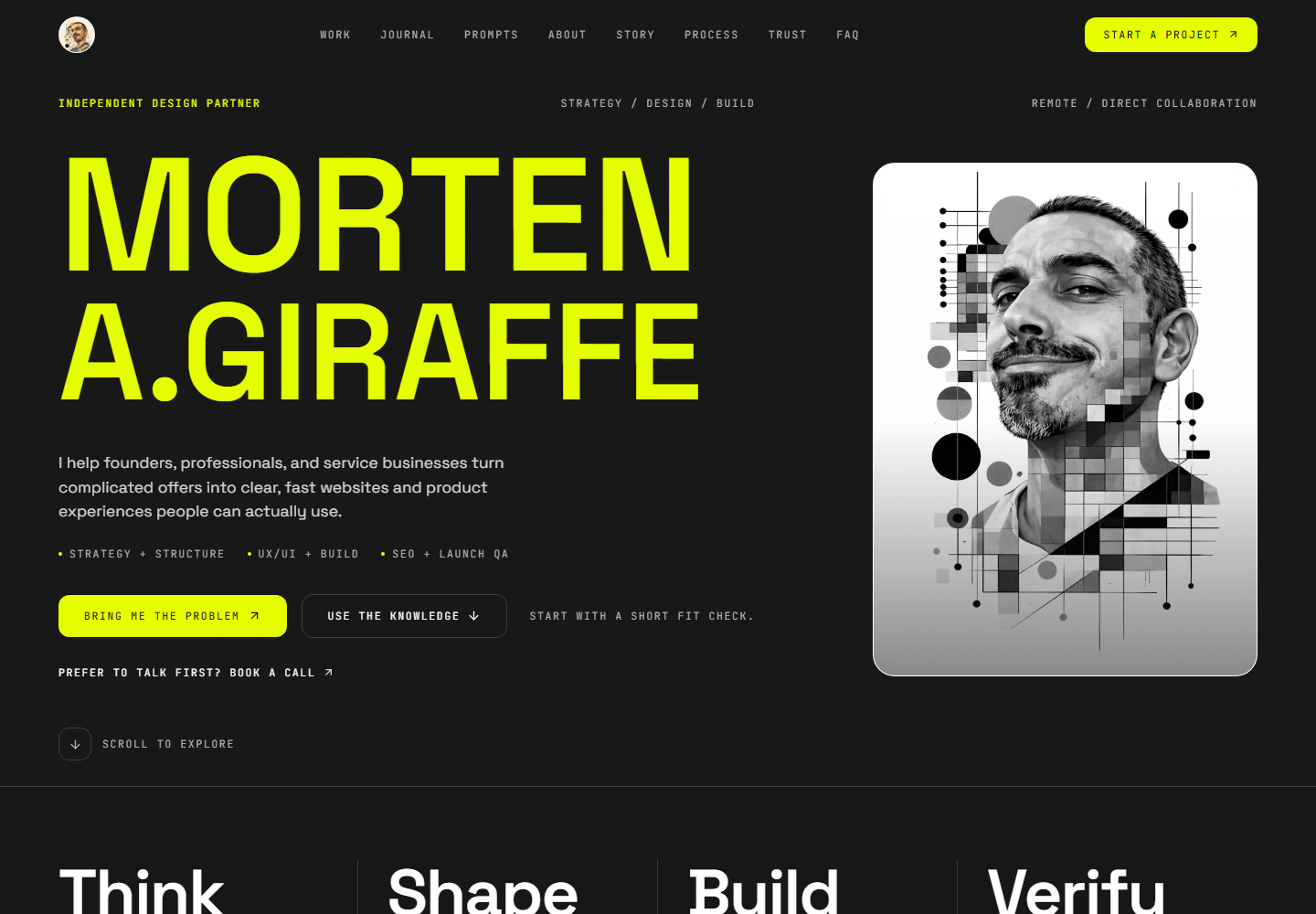
Observed reference: public homepage · 26 Oct 2026 · 1440 × 1000 viewport. A moment in time, not proof of every state.
01 / LOOK BEYOND THE SCREENSHOT
A screenshot shows the result. A blueprint records the decisions.
An extractor can find a color or a large heading. It cannot tell you whether that value belongs everywhere, how an error should recover, or whether the structure fits your product. Start with evidence, then make the missing decisions explicit.
Observed
The homepage capture above records visible content at one width and date. It does not establish hidden states, mobile behavior or motion timing.
Reviewed
The reference palette, font roles, current 24/16/12px shape scale and interaction principles were checked against this site’s design document and source.
Still a decision
Whether these choices fit your audience. Alternative accents, compact spacing and square shapes are starter adaptations—not extracted themes.
02 / ONE MODEL, THREE USEFUL FILES
Try it. Then take it with you.
Choose a bounded variation. The sample and all three downloads use the same settings. Nothing changes the design of this website or publishes your selections.
YOUR STARTER / LOCAL SETTINGS
Make a considered variation.
Canvas#f4f3ee
Ink#111111
Accent#e5ff00
Ink on accent: 16.76:1. One pair checked; not an accessibility certification.
GENERATED HTML SAMPLE
A responsive sample, not the source screenshot. Uses offline system fonts. Width is capped by your screen; scroll inside the preview to explore it.
Settings stay in this browser tab. No account, upload or payment.
Prefer the reviewed defaults? Download without customizing.
These ordinary download links also work without JavaScript. The interactive builder requires JavaScript.
03 / THE DESIGN DECISIONS
Write rules a builder can use.
Read each decision as a small review: what is the rule, what should you test, and what evidence actually supports it?
01
Give colors a job.
Name roles before naming shades.
The reviewed system uses off-white for reading, charcoal for dark editorial bands, ink for text and lime for the primary action. A palette becomes useful when it tells a builder where a color belongs—and where it does not.
Try this: Choose the primary text and canvas first. Check the action label against its background. Repeat for muted text, hover, focus and error states; a passing hero does not prove the rest of the page.
Reviewed: current repository tokens. The alternative accent options in the lab are adaptations, not extracted themes.
02
Build a reading order.
Use scale to express importance.
Space Grotesk carries the site’s headings and body copy; JetBrains Mono marks short labels and metadata. Keep one clear H1 and use smaller headings in compact spaces. A screenshot’s giant desktop heading is not a universal font-size token.
Try this: Read only the headings. They should explain the page. Then test your longest real title at a narrow width and at enlarged text size. Keep body copy comfortable and avoid manual line breaks to rescue one viewport.
Reviewed: font roles and type hierarchy. The standalone sample uses offline system fonts, so its typography is illustrative.
03
Let the gaps explain.
Related things sit closer together.
The site uses a shared page shell and section rhythm. Labels stay close to their content; separate topics get more space. Comfortable and compact modes in this starter change the example gap and panel padding without shrinking interactive targets.
Try this: Remove decorative containers. If grouping becomes unclear, fix proximity and headings first. Use a short spacing scale rather than adjusting every margin independently.
Reviewed: shell and editorial rhythm. The lab’s 16px and 24px spacing choices are intentionally bounded starter settings.
04
Design around real content.
The structure should survive different words.
Full-width bands establish the reading sequence. Framed areas hold genuine tools, examples and images. This lab uses a two-column sample that becomes a single reading column on small screens; it is not a template for every product.
Try this: Replace short sample copy with a long heading, a missing image and an extra paragraph. Keep the primary action discoverable and the DOM order meaningful without CSS.
Reviewed: editorial bands and limited framing. Inferred: whether this structure suits your own product.
05
Specify the other states.
A component is more than its resting appearance.
The current site uses a 24px large-panel, 16px compact-panel and 12px control radius scale. Buttons need focus and disabled behavior. Forms need validation, pending, success and failure states. The sample field demonstrates focus only; it is not a working contact form.
Try this: Write a small state table before implementation. State the trigger, message, focus behavior and recovery action. Never label a network request successful merely because a button was clicked.
Reviewed: current shape hierarchy and component requirements. Square mode is an optional adaptation.
06
Keep the meaning at every width.
Reflow the layout; preserve the task.
The useful question is where the content stops fitting. Do not hide explanation, labels or next steps to make a mobile screenshot look cleaner. The preview width controls let you inspect reflow; the browser can also shrink the frame to fit your actual screen.
Try this: Check 375, 390, 768, 1024 and 1440px, then try text zoom. Inspect navigation, long code blocks and controls as well as the hero. No page-level horizontal scrolling should be necessary.
Reviewed: project verification widths. A single homepage capture does not prove responsive behavior.
07
Make the interaction available.
Contrast is one check, not the verdict.
This lab calculates ink-on-accent contrast from the selected colors. It does not certify your website. Keyboard operation, focus visibility, labels, source order, errors, zoom and assistive technology still need review in the implemented project.
Try this: Put the mouse aside. Reach every control, change every setting, copy a prompt and recover from a failed copy. Verify announcements reflect the actual result, and never use color alone to explain state.
Reviewed: keyboard and contrast requirements. Whole-project accessibility remains unverified until tested.
08
Move only when it helps.
Content must not wait for an effect.
The reference easing is cubic-bezier(0.22, 1, 0.36, 1). That is not a reason to animate everything. This starter needs no animation. If you introduce motion, use it to clarify change and provide a reduced-motion path.
Try this: Turn reduced motion on and JavaScript off in separate checks. Important content should remain readable. Do not use autoplay, scroll interception or hover-only instructions to carry essential information.
Reviewed: existing motion policy. Timing and effects not demonstrated by the screenshot must not be presented as measured facts.
04 / CONTEXT BEFORE CODE
Make it part of your project’s memory.
Start with the product. Use prd.md to define the audience, main task, real content and boundaries.
Review the reference. Download your starter, identify the proposed adaptations and reconcile them with any existing design authority. Keep one canonical DESIGN.md.
Connect the files. Reference visual rules from system_patterns.md. Keep dependencies and infrastructure decisions in architecture.md.
Build one slice. Put the representative route and its checks in implementation_plan.md. The sample HTML is a learning aid, not permission to replace your application.
Record the result. Store verified behavior, remaining gaps and the next action in progress.md. Revisit DESIGN.md when an approved decision changes.
Attach the export and your actual project documents. Replace bracketed fields. Each prompt has a different job; copying one does not authorize deployment.
01 / Reconcile the reference
Act as the design-system reviewer for this project. Read its existing instructions, DESIGN.md, PRD, architecture and styling source before proposing changes. Use the attached Design Blueprint export as a reference, not a replacement authority. Identify which decisions are observed, reviewed, inferred or still unknown. Compare color roles, typography, spacing, component states, responsive behavior, accessibility and motion against our actual users and content. Return a compact keep/adapt/reject table with reasons and exact source references. Flag contradictions and ask only questions that block a decision. Do not edit files, add dependencies, invent evidence or copy Morten’s personal identity, biography or project claims. Finish with a proposed project-specific DESIGN.md outline and the decisions requiring owner review.
02 / Build one representative page
Implement the approved design decisions on one representative route: [route]. First read repository instructions, DESIGN.md, PRD, architecture, system_patterns.md and progress.md. Confirm the allowed files and preserve unrelated edits. Reuse current tokens, components and dependencies. Treat the attached HTML as an illustrative sample, not production code or permission to replace the stack. Plan the smallest change covering real content, normal/empty/error states, responsive layout, keyboard paths and reduced motion. Use semantic HTML and visible labels. Keep the source screenshot separate from generated output. Before claiming completion, run the repository checks, test interactions at 375/390/768/1024/1440px, inspect contrast and overflow, and record before/after evidence. Report exact files, commands, results, skipped checks and rollback. Do not deploy, add paid services or broaden scope without the project’s explicit authorization.
03 / Review the implementation
Review [route] against the approved DESIGN.md and product requirements. Inspect the actual rendered page and relevant source. Check hierarchy, long real content, color roles, focus, labels, disabled/pending/error/success states, responsive reflow, zoom, reduced motion and no-JavaScript reading access. Compare the implementation with the approved evidence, not just the sample image. Rank findings by user impact and cite the exact route, state, viewport and source. Separate verified findings from assumptions and unavailable checks. Do not infer clipboard success, a saved download, a social follow or a completed share from click events. Propose the smallest scoped fixes. Finish with a release recommendation, remaining risks and a progress.md handoff; do not claim a pass for tests you did not run.
06 / BEFORE YOU BUILD
The useful questions.
What does DESIGN.md do?
It records the visual and interaction decisions a person or coding assistant should preserve: tokens, type roles, layout rules, component states, accessibility and motion. It supports the product requirements and technical architecture; it does not replace them or guarantee a good implementation.
Is this the complete source design system of this website?
No. It is a reviewed teaching reference and a project starter based on selected current site conventions. The repository’s DESIGN.md remains the full authority for this website. The export includes your chosen adaptations and marks decisions that need review for your project.
Why does the HTML use different fonts?
The source website uses Space Grotesk and JetBrains Mono. The self-contained example uses local system fonts so it opens offline without contacting a font provider. Add approved font files through your project’s existing loading method after checking licensing and performance.
Are the screenshot and preview the same thing?
No. The dated screenshot records the public homepage at one viewport. The HTML preview is a generated teaching sample using your selected settings. Neither proves unseen screens, server behavior or every responsive and accessibility state.
Can I enter any website URL to extract its design?
This release explores one reviewed reference. It does not fetch arbitrary websites or accept uploads. An extractor can suggest values, but a useful design system still needs human decisions about intent, states, rights and project fit.
Can I use the downloaded starter in my own project?
Yes—adapt the provided starter templates, CSS and HTML to your project. They are educational starting points, not a finished product. This invitation does not include Morten’s identity, portrait, screenshot, client imagery, biography or third-party assets. Use your own content and properly licensed imagery.
How do I connect this with the Context Engine?
Review and adapt the export, then store it at your project’s established DESIGN.md path. Keep a short design brief in prd.md and reference the detailed design file from system_patterns.md. Put implementation tasks in implementation_plan.md and verified outcomes in progress.md. Avoid maintaining conflicting duplicate rules.
Will my selections or documents be uploaded?
The builder calculates previews and downloads in your browser. It does not upload documents, save your settings to an account or include them in the shared link. Reloading resets the builder. Existing site analytics may measure visits under the site privacy policy; this release adds no builder-specific analytics events.
What if copying or downloading does not work?
Every prompt remains selectable. Copy controls show a recovery message if the browser denies clipboard access. Default files are available as ordinary links, including without JavaScript. For a customized download, allow your browser’s download action or try another browser. A download-start message cannot prove the file was saved.
Does the contrast check certify accessibility?
No. It checks one specified foreground/background pair mathematically. Your final interface also needs checks for other color pairs, keyboard access, focus, zoom, labels, error recovery and assistive technology. Changes to fonts, transparency or backgrounds can change the result.
Is it free, and do I need an account?
The guide, customization and starter downloads are available without payment or registration. If you want help adapting the system or implementing a real website, the project inquiry link opens the existing contact journey. It does not purchase or subscribe you to anything.
Does sharing publish my customization?
No. Share and copy-link controls use the public guide URL only. Your selections are not encoded in the link. A native share dialog result does not prove a social post was published, and an outbound social link does not prove a follow.
07 / PUT THE BLUEPRINT TO WORK
Good decisions deserve a real website.
Have the reference, but need a hand with the build? Bring your product, your content and the part that isn’t working yet.